Protecting Your Data: Security Features of the Cloud Drive App
In today's digital age, protecting your data is more important than ever. With the rise of cloud storage solutions, it's crucial to ensure that your information is secure and accessible at all times. One such tool that can help you do just that is the Cloud Drive App, which offers a range of security features to keep your data safe. In this blog post, we'll explore some of the key security features of the Cloud Drive App and how they can help you protect your valuable information.
Multi-Cloud Support: Connect to various cloud storage providers like AWS, Wasabi, Lyve, and Obsidian
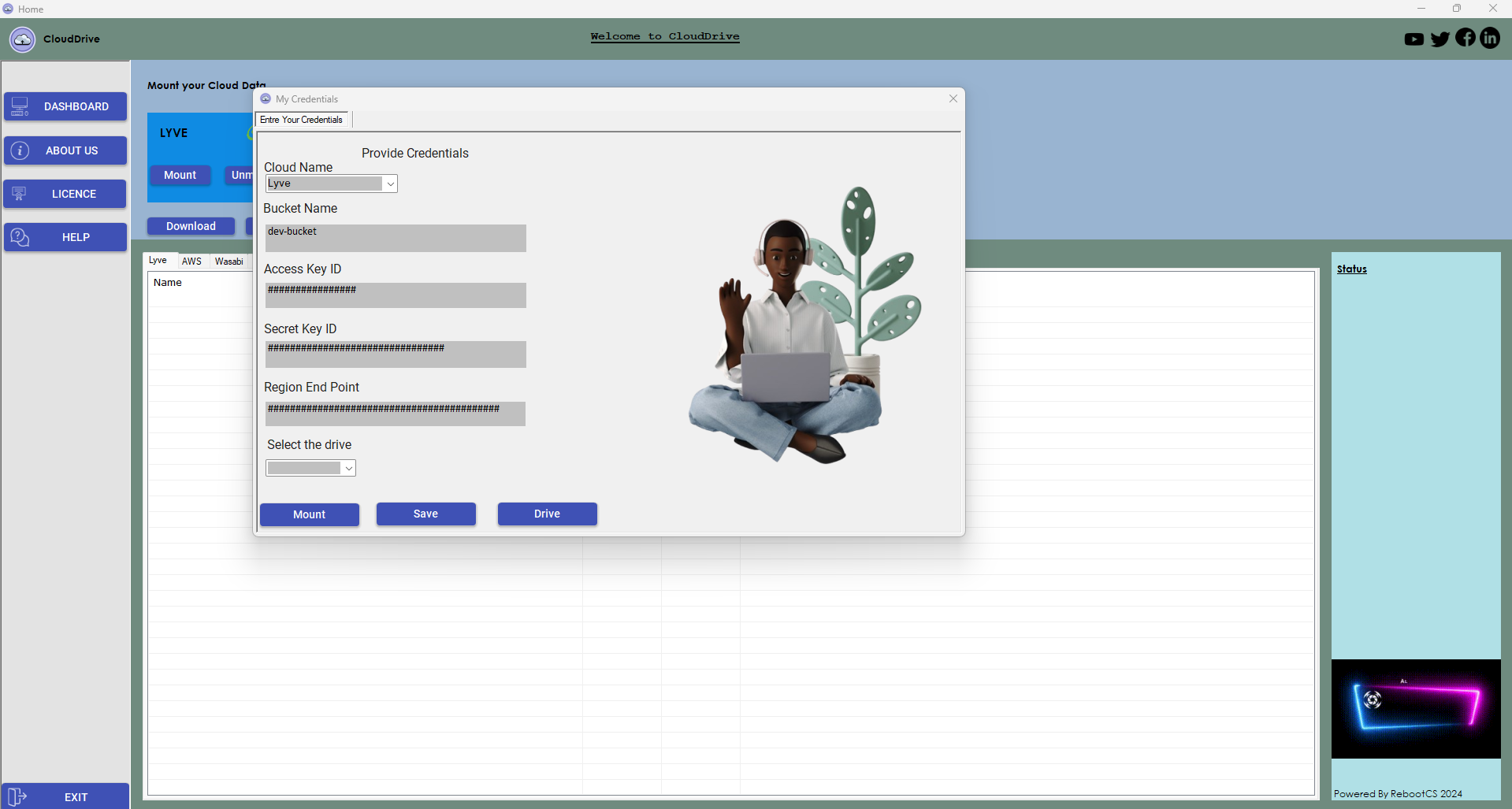
One of the standout features of the Cloud Drive App is its support for multiple cloud storage providers. This means that you can easily connect to popular services like AWS, Wasabi, Lyve, and Obsidian, allowing you to access and manage all of your cloud storage accounts in one convenient location. By consolidating your cloud storage accounts in the Cloud Drive App, you can streamline your workflow and ensure that all of your data is easily accessible and secure.
Mount Cloud Storage: Mount cloud storage buckets as virtual drives on a local system
Another key feature of the Cloud Drive App is the ability to mount cloud storage buckets as virtual drives on your local system. This means that you can access your cloud storage just like you would any other drive on your computer, making it easy to upload, download, and manage files without having to navigate through a web browser. By mounting cloud storage as virtual drives, you can seamlessly integrate your cloud storage into your existing workflow and access your data with ease.
File Management: Effortlessly download and upload files between the local system and cloud storage
The Cloud Drive App also offers robust file management capabilities, allowing you to effortlessly download and upload files between your local system and cloud storage. Whether you need to backup important documents, share files with colleagues, or access data on the go, the Cloud Drive App makes it simple to manage your files securely and efficiently. With features like drag-and-drop functionality and file synchronization, you can easily transfer files between your local system and cloud storage with just a few clicks.
Credential Management: Securely save and load cloud credentials for easy access
Security is paramount when it comes to managing your cloud storage accounts, which is why the Cloud Drive App includes robust credential management features. With the ability to securely save and load cloud credentials within the app, you can easily access your cloud storage accounts without having to repeatedly enter sensitive information. By securely storing your credentials within the app, you can ensure that your data is protected and easily accessible whenever you need it.
Dynamic Region Handling: Adaptively manage cloud regions based on user input
In addition to its security features, the Cloud Drive App also offers dynamic region handling capabilities, allowing you to adaptively manage cloud regions based on user input. This means that you can easily switch between different cloud regions to optimize performance, reduce latency, and ensure that your data is stored in the most secure and efficient location. By dynamically managing cloud regions, you can tailor your cloud storage setup to meet your specific needs and ensure that your data is always secure and accessible.
Search Functionality: Filter files within the cloud storage interface using a search query
Finally, the Cloud Drive App includes powerful search functionality, allowing you to filter files within the cloud storage interface using a search query. Whether you're looking for a specific document, image, or video, the app's search feature makes it easy to quickly locate the files you need. By enabling you to search for files within the app, you can save time and effort when managing your cloud storage and ensure that your data is organized and easily accessible.
In conclusion, the Cloud Drive App offers a range of security features to help you protect your data and manage your cloud storage accounts with ease. From multi-cloud support and file management capabilities to credential management and dynamic region handling, the app provides everything you need to keep your information secure and accessible at all times. Whether you're a business professional looking to streamline your workflow or an individual user in need of a secure storage solution, the Cloud Drive App is a powerful tool that can help you protect your data and ensure that it's always available when you need it.